Hi,
Recently I was part of the discussion and found few interesting things when discussing the automation and backup of the critical environmental components.
Infrastructure contains vRA 6.2.x and vRO and all the virtual machines are using the Templates situated on vCenter Server.
Now the backup solution in use is EMC Networker which replaced Veeam recently.
Due to left over snapshots and not regular clean up were the main reasons to change the backup solution.
After having discussion with the Backup Team they sent the list of the permission the backup user needed on vCenter Server as follows.
As per NetWorker-8.2-SP1-VMware-Integration-Guide (Refer Page 44)

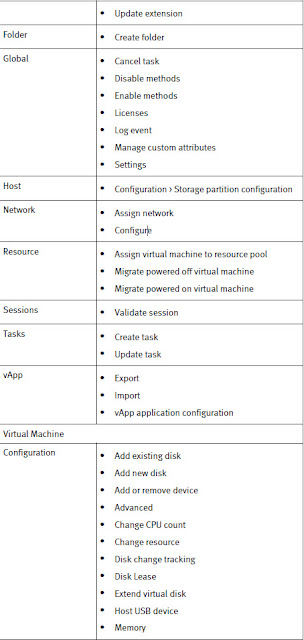

Now the above permission were assigned the service account which was created on vCenter Server.
But when the Backup Team tried to register the service they were getting an error.
I have assigned the Full Administrator Role in vCenter to that Service Account then the registration was successful.
Now I am not sure what exact permissions are required just to register the extension/service with vCenter Server. So asked the same question back to the Backup Team and they in turn asked to EMC support the same question and the answer received was to go through the above permissions only.
Now my question is WHY the EMC Networker service account user needs Administrator Role on vCenter Server to do the Backup and Restore of the VMs ??
As from Security perspective this is clearly a risk to assign the Admin Role level access to vCenter Server as it has enough rights to do any kind of destruction in vCenter Server.
I have looked at the other permission for restore and from the documentation found out the following.
"permissions requirements
· The account used to log into the "EMC Data Protection Restore Client" login page must have Administrator rights in vCenter (or the user must be assigned to the role that contains the minimum vCenter user account permissions for EMC Backup and Recovery).
· The Account and role with the minimum vCenter account permissions must be assigned to the root of the vCenter and the option to propagate must be selected. (Add to root, not through a group)·
· The user account being used must also be part of the Local Administrators group on the server that is performing the file level recovery - it cannot be an AD account, (explicitly add the account to the Local Administrator group on the recovery virtual machine)
· This is required for the File Level recovery process to access the local resources on the virtual machine performing the recovery.
· Ensure that the virtual machine performing the file level recovery is part of the same vCenter server as the source virtual machine.
· The File Level recovery also interacts with the virtual machine VMware Tools, so ensure the VMware tools are installed and up to date."
So even we need to create a local user on the vCenter Server which must have the Admin privilege.
Again a security concern there. Now to get the backup going for the templates, such compromised was needed as I have tried assigning different role to the vCenter Service Account (with Backup role, and also tried changing permission on specific components from the table) but none worked.
The biggest challenge with Networker we found is to backup Templates.
EMC Network CAN'T Backup Templates. (on page 82 of the same guide). BOOOOMMM .....

This was the biggest surprise to us as we have the vRA/vRO components backed up using the same solution but what about Templates. As the vRA blueprints relies on the vCenter Templates they needs to be backed up regularly in case of a disaster.
We got few options on our hand to backup the Templates
a) Convert the Templates into VMs a day before the scheduled Backup and after the backup successfully run then convert them back to Templates
Downside/s of doing that are
1) The whole automation platform is not available to the DevOps community internally during that time
2) If the backup fails for X reason we might have to attempt one mote time and it will be a down time for the end user and keeping track of such missed backup and then schedule them again and again is a simple Pain.
3) Put a change request each time when we convert the templates and one person has to stay late to make sure all the Templates are converted to VMs properly and none left out which is more man hours on each window.
b) 2nd option was to use the Linked clone/s for vRA which is/are nothing but powered off VM/s with a snapshot on it and that DO NOT have a .vmtx format so for EMC Networker, its easy to Backup the same.
Downside of doing this
1) Each VM has a snapshot for not reason and every change to the template will grow the snapshot and we are unnecessarily occupying the space on the SSD storage (yes Xtreme IO) on the back which is not advisable when the matter comes to SLA.
2) Management to differentiate between the actual Linked clones which we are using to serve other Team (such as Server Team and Database Team) to give them ready made VMs with necessary OS/Applications loaded based on the blue print selection and they will change the IP/DNS entries based on the type of VM and the person who requested (yes IPAM solution is Work-in-progress :-))
c) The last option was to not use any of the above but just dedicate a separate LUN where we can store the Templates and then replicate the LUN
Downside of doing this
1) We need an additional LUN which is not cost effective
2) More manageability from storage perspective
As option C was more effective apart from the cost involved, we had no other choice as it was easy for time being till EMC come up with an actual fix to resolve such issue in any future release.
Now not having such functionality is totally a down hill in the whole backup plan and such dilemma was resolved by putting the templates on a specific LUN and then replicate that LUN on to a DR Site using EMC Recover Point.
Eventually we took care of the Backup for Templates but could not understand the reason why such support is not provided. Is it Technical ly not possible which is hard to believe or some other gotchas involved (which I dont have any idea about).
Hopefully this will help people running in to the same situation and gives a better option to decide which solution to go with.
Recently I was part of the discussion and found few interesting things when discussing the automation and backup of the critical environmental components.
Infrastructure contains vRA 6.2.x and vRO and all the virtual machines are using the Templates situated on vCenter Server.
Now the backup solution in use is EMC Networker which replaced Veeam recently.
Due to left over snapshots and not regular clean up were the main reasons to change the backup solution.
After having discussion with the Backup Team they sent the list of the permission the backup user needed on vCenter Server as follows.
As per NetWorker-8.2-SP1-VMware-Integration-Guide (Refer Page 44)


Now the above permission were assigned the service account which was created on vCenter Server.
But when the Backup Team tried to register the service they were getting an error.
I have assigned the Full Administrator Role in vCenter to that Service Account then the registration was successful.
Now I am not sure what exact permissions are required just to register the extension/service with vCenter Server. So asked the same question back to the Backup Team and they in turn asked to EMC support the same question and the answer received was to go through the above permissions only.
Now my question is WHY the EMC Networker service account user needs Administrator Role on vCenter Server to do the Backup and Restore of the VMs ??
As from Security perspective this is clearly a risk to assign the Admin Role level access to vCenter Server as it has enough rights to do any kind of destruction in vCenter Server.
I have looked at the other permission for restore and from the documentation found out the following.
"permissions requirements
· The account used to log into the "EMC Data Protection Restore Client" login page must have Administrator rights in vCenter (or the user must be assigned to the role that contains the minimum vCenter user account permissions for EMC Backup and Recovery).
· The Account and role with the minimum vCenter account permissions must be assigned to the root of the vCenter and the option to propagate must be selected. (Add to root, not through a group)·
· The user account being used must also be part of the Local Administrators group on the server that is performing the file level recovery - it cannot be an AD account, (explicitly add the account to the Local Administrator group on the recovery virtual machine)
· This is required for the File Level recovery process to access the local resources on the virtual machine performing the recovery.
· Ensure that the virtual machine performing the file level recovery is part of the same vCenter server as the source virtual machine.
· The File Level recovery also interacts with the virtual machine VMware Tools, so ensure the VMware tools are installed and up to date."
So even we need to create a local user on the vCenter Server which must have the Admin privilege.
Again a security concern there. Now to get the backup going for the templates, such compromised was needed as I have tried assigning different role to the vCenter Service Account (with Backup role, and also tried changing permission on specific components from the table) but none worked.
The biggest challenge with Networker we found is to backup Templates.
EMC Network CAN'T Backup Templates. (on page 82 of the same guide). BOOOOMMM .....

This was the biggest surprise to us as we have the vRA/vRO components backed up using the same solution but what about Templates. As the vRA blueprints relies on the vCenter Templates they needs to be backed up regularly in case of a disaster.
We got few options on our hand to backup the Templates
a) Convert the Templates into VMs a day before the scheduled Backup and after the backup successfully run then convert them back to Templates
Downside/s of doing that are
1) The whole automation platform is not available to the DevOps community internally during that time
2) If the backup fails for X reason we might have to attempt one mote time and it will be a down time for the end user and keeping track of such missed backup and then schedule them again and again is a simple Pain.
3) Put a change request each time when we convert the templates and one person has to stay late to make sure all the Templates are converted to VMs properly and none left out which is more man hours on each window.
b) 2nd option was to use the Linked clone/s for vRA which is/are nothing but powered off VM/s with a snapshot on it and that DO NOT have a .vmtx format so for EMC Networker, its easy to Backup the same.
Downside of doing this
1) Each VM has a snapshot for not reason and every change to the template will grow the snapshot and we are unnecessarily occupying the space on the SSD storage (yes Xtreme IO) on the back which is not advisable when the matter comes to SLA.
2) Management to differentiate between the actual Linked clones which we are using to serve other Team (such as Server Team and Database Team) to give them ready made VMs with necessary OS/Applications loaded based on the blue print selection and they will change the IP/DNS entries based on the type of VM and the person who requested (yes IPAM solution is Work-in-progress :-))
c) The last option was to not use any of the above but just dedicate a separate LUN where we can store the Templates and then replicate the LUN
Downside of doing this
1) We need an additional LUN which is not cost effective
2) More manageability from storage perspective
As option C was more effective apart from the cost involved, we had no other choice as it was easy for time being till EMC come up with an actual fix to resolve such issue in any future release.
Now not having such functionality is totally a down hill in the whole backup plan and such dilemma was resolved by putting the templates on a specific LUN and then replicate that LUN on to a DR Site using EMC Recover Point.
Eventually we took care of the Backup for Templates but could not understand the reason why such support is not provided. Is it Technical ly not possible which is hard to believe or some other gotchas involved (which I dont have any idea about).
Hopefully this will help people running in to the same situation and gives a better option to decide which solution to go with.
Please share and Care !!
